01 · Evicourse Internal System
Customer Onboarding Automation
Connecting agreements, billing, document management, and customer access through one coordinated onboarding process.
- Classification
- Evicourse Internal System
- Discipline
- Workflow Automation & Systems Integration
02 · The Challenge
What needed to work better.
Customer onboarding requires agreements, signatures, financial records, documentation, account creation, service access, invoices, and support to stay coordinated.
When those activities live in disconnected applications, each handoff creates another opportunity for duplicate entry, inconsistent records, or administrative delay.
The solution needed to support the customer relationship beyond document signing. It had to coordinate agreements, financial records, storage, identity, support, and product access.
Rather than rebuilding mature business applications, I retained tools suited to their responsibilities and designed the connections between them.
Processes to coordinate
- Prepare proposals and agreements
- Collect signatures
- Maintain financial records
- Archive documentation
- Create customer accounts
- Grant service and product access
03 · The Solution
From agreement to customer access.
- 01
Send proposal package
Evicourse sends the Statement of Work, estimate, and contract documents.
- 02
Customer signs
The customer reviews and signs the agreement. Completion initiates the onboarding event.
- 03
Confirm and archive
Confirmation and signed copies are delivered, and documents are archived in Google Drive.
- 04
Prepare customer access
Customer records are coordinated and a portal invitation is issued.
- 05
Customer activates account
The customer accepts the invitation and confirms profile information.
- 06
Portal access granted
The customer can reach account information, invoices, helpdesk, and authorized products such as North Star.
04 · Behind the System
Technology with a defined responsibility.
Evicourse needed a more efficient way to manage customer onboarding, from preparing agreements to providing access to customer services and products.
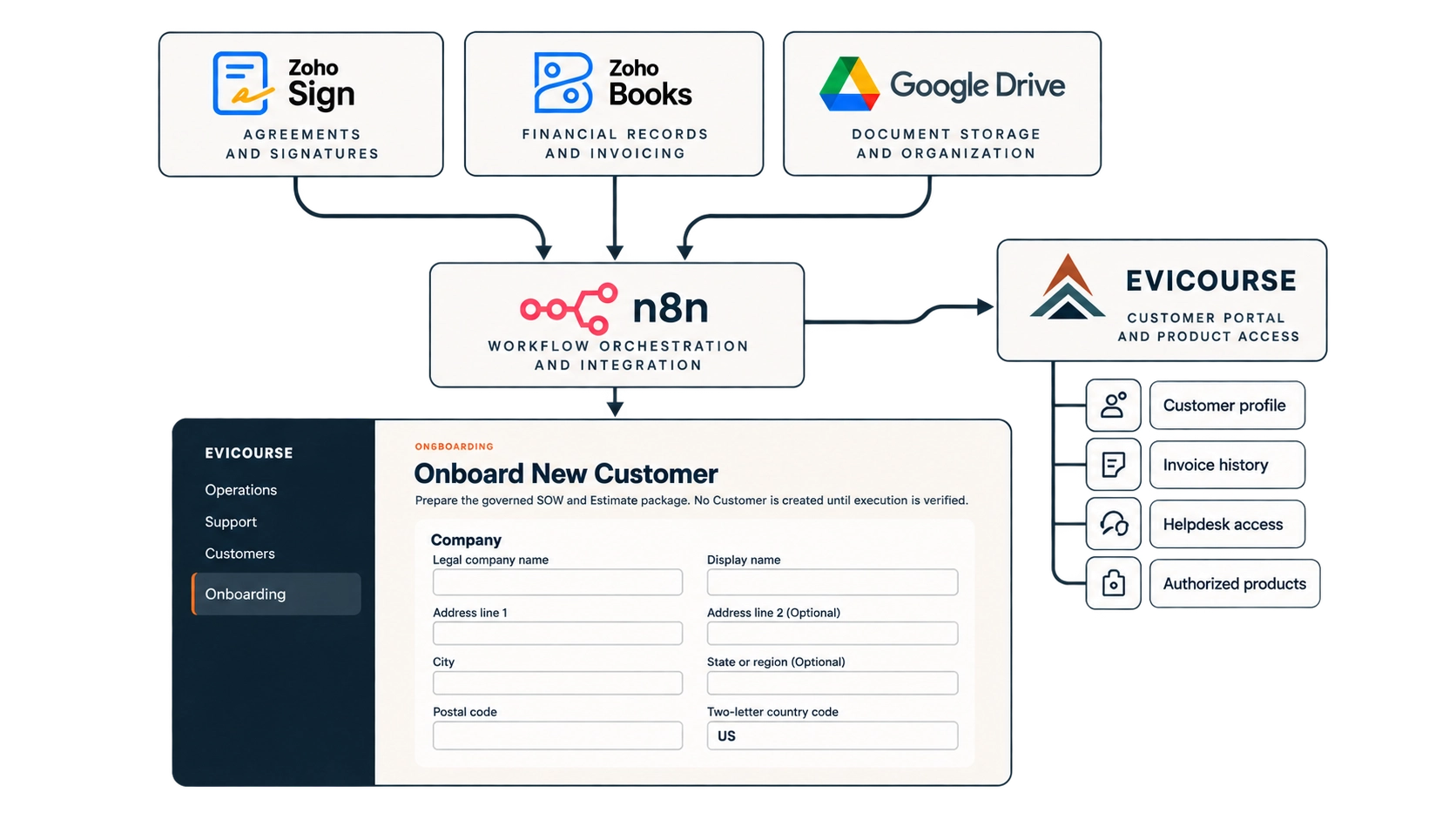
I designed a connected system using specialized business applications, workflow automation, and a custom-built customer portal. The objective was to reduce repetitive administrative coordination, maintain consistent customer records, and create a unified customer experience.
Zoho Sign
ResponsibilityCustomer document review and signature.
Keeps agreement delivery and signing in a purpose-built document workflow.
Zoho Books
ResponsibilityEstimates, customer financial records, and invoicing.
Preserves financial operations in the system responsible for them.
Google Drive
ResponsibilityDocument storage and organization.
Provides an established workspace for retained agreement records.
n8n
ResponsibilityEvent-driven workflow orchestration and integration.
Coordinates business events across applications without making one tool responsible for every function.
Evicourse Accounts
ResponsibilityCustomer profile, invoices, helpdesk, and authorized product access.
Supplies the customer-facing capability that the specialized back-office tools do not provide together.
05 · Implementation
Evidence of the work.
The completed signature notification is the business event that starts the automation. n8n receives and validates that event, normalizes it, records the signed agreement, and coordinates the downstream customer records and account-provisioning steps.
The available workflow evidence includes local UAT stop nodes. It supports the implemented components shown below, but it does not establish complete end-to-end production execution.
Evicourse System Diagram · Event-Driven Automation
What happens automatically
Once a customer signs an agreement, the onboarding workflow begins. Instead of manually coordinating records across disconnected applications, the system validates the completion event and initiates customer setup across the appropriate services.
Customer action · Trigger
Customer signs the agreement
Zoho Sign notifies the system when the agreement has been completed.
Technology · Zoho SignAutomation · n8n
n8n coordinates the workflow
n8n receives the completion event, processes the agreement information, and coordinates the connected systems.
- 01
Verify the agreement
Confirm the completion event, identify the corresponding agreement, and record its completion.
Technology · n8n / Evicourse - 02
Prepare financial records
Create or link the customer record in the financial system.
Technology · Zoho Books - 03
Prepare customer account
Create the corresponding customer record in Evicourse Accounts.
Technology · Evicourse Accounts
After recording the agreement, the workflow also returns an accepted response to the Zoho Sign webhook.
Customer activation · Human handoff
Customer completes their profile
After the invitation is issued and accepted, the customer completes account setup and receives authorized access to their services.
Human participation resumesThe result
A signed agreement initiates coordinated customer setup across connected applications, reducing the need to manually recreate customer records and manage separate administrative handoffs.
06 · Outcomes & Learnings
What the work establishes.
Designed journey and core workflow components are implemented. End-to-end behavior and later provisioning stages remain under validation.
- Specialized software remains responsible for the work it handles well.
- A meaningful business event can initiate coordinated onboarding steps.
- Shared customer information can move through the process more consistently.
- Evicourse Accounts provides one customer-facing point for services and access.
- Human decisions remain in the agreement and service process.
- The architecture creates a foundation for additional products and services.